 PteroWrapper
One wrapper.
Everything managed.
Run Node.js and Python bots, Minecraft servers and tunnels from one process, with a web dashboard you can share.
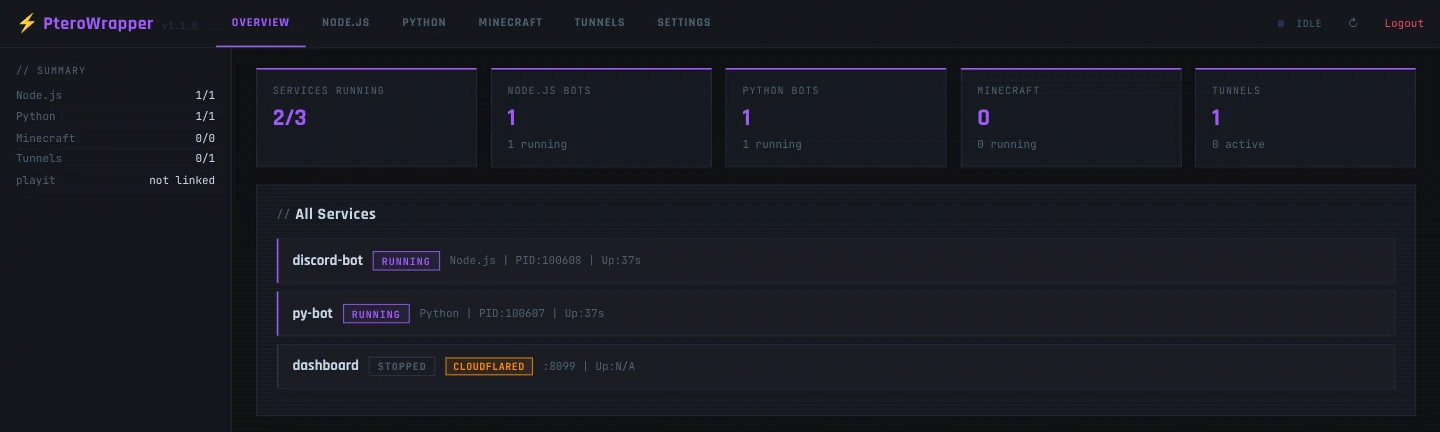
Everything your server needs, in one process
PteroWrapper is the combined functionality of NodeRunner, PyRunner and TunnelMC, compiled into a single wrapper. It works the same self-hosted on a home machine as it does on Pterodactyl, even when the Minecraft server itself is stopped.
Manage it, and share access, from anywhere
A sidebar-driven web UI with live status, log viewers with severity filtering, add, edit and delete for every bot, server and tunnel, and categorized settings.
Pair it with a tunnel and you can check on things, or hand console access to a friend or co-admin, without SSH, RDP or Pterodactyl at all.
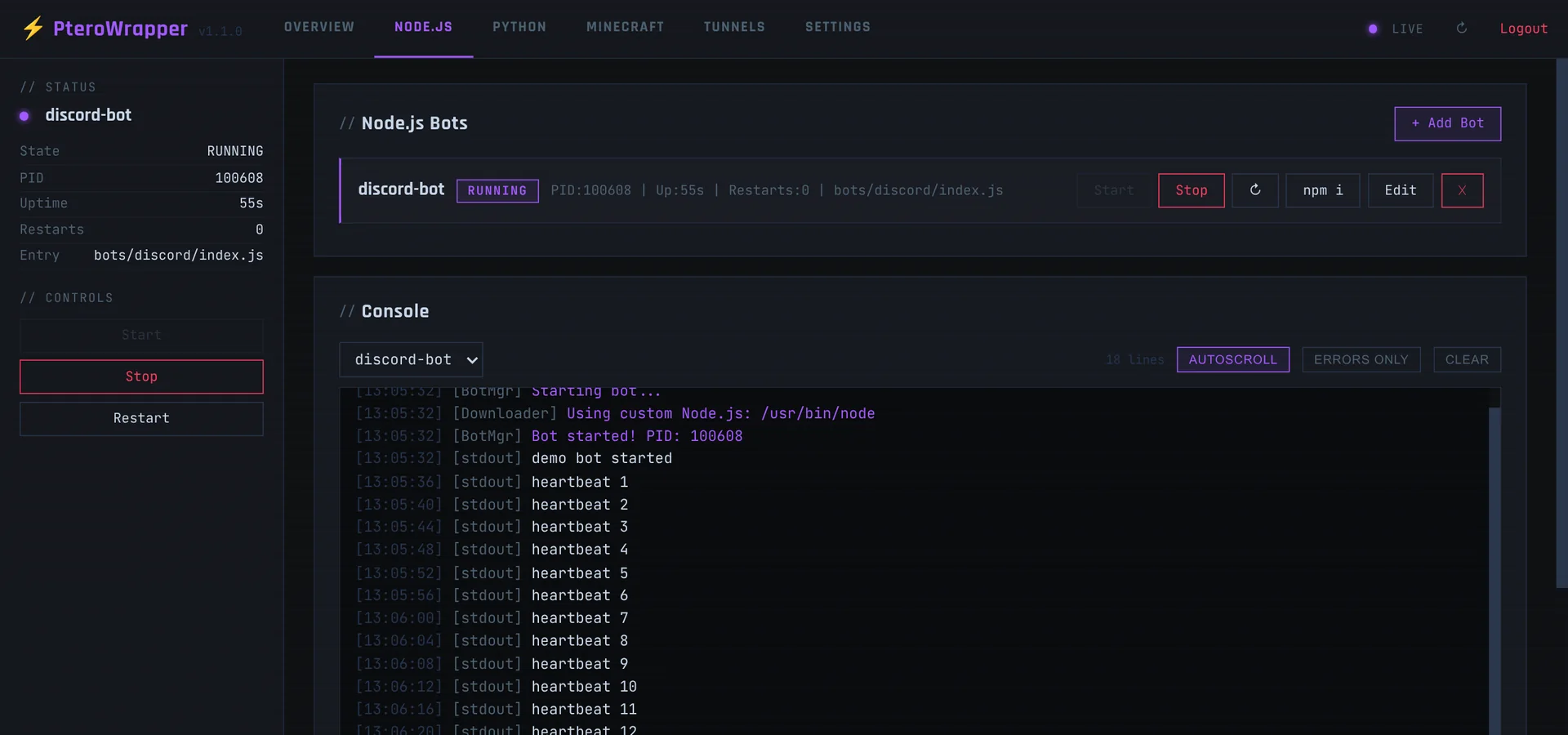
Multi-bot management
Run multiple Node.js and Python bots at once, each with independent start, stop and restart, crash-loop protection, and its own live console.
Multiple Minecraft servers
Spawn one or more servers as child processes with full stdin and stdout piping. On Pterodactyl, port and JVM memory auto-detect from the container's allocation when left blank.
Three tunnel providers
ngrok, cloudflared and playit.gg, configurable per tunnel. Mix them freely, and add, edit or delete them live from the dashboard.
Crash-loop protection
Every managed process shares one windowed crash-restart policy: retry with a delay, and stop retrying if it fails too often too fast.
Zero-config start
Auto-downloads Node.js, creates Python venvs, auto-downloads tunnel binaries and accepts the Minecraft EULA, all on first use.
Console commands too
Everything the dashboard can do is also a console command, in Pterodactyl's console or a plain terminal.
Set up in four steps
No plugins/ folder. PteroWrapper is the process itself, whether that's a Pterodactyl egg or java -jar on your own machine.
- Download
PteroWrapper.jar. Self-hosting? Runjava -jar PteroWrapper.jar. On Pterodactyl, upload it, then either rename it to match your egg's "Server Jar File" startup variable (oftenserver.jar) or change that variable toPteroWrapper.jar. Either way there's no need to touch the startup command. - Start the server. PteroWrapper generates
config.ymlon first run and, if no tunnels are configured, exposes the dashboard through a cloudflared quick tunnel. - Open the printed URL and log in.
- Add bots, Minecraft servers and tunnels from the dashboard, or edit
config.ymldirectly and runreloadfrom the console.
minecraft:
  servers:
    - name: "survival"
      jar-file: "server.jar"
      port: ""          # blank = read $SERVER_PORT
      jvm-args: ""      # blank = derive from $SERVER_MEMORY
      auto-start: true

tunnels:
  entries:
    - name: "dashboard"
      port: 8080
      provider: "cloudflared"
      auto-start: true

node:
  bots:
    - name: "discord-bot"
      entry-file: "bots/discord/index.js"
      auto-start: true
Discord control, as a separate plugin
A real Discord bot with /node, /python, /mc, /tunnel and /status slash commands and per-command permissions. It is kept out of the base install because the Discord library it needs adds about 16 MB that most people don't want.
- Download
discord-plugin.jarand place it in apterowrapper-plugins/folder next toPteroWrapper.jar. The dashboard's Settings tab also has a one-click "Download & Install" button. - In Settings, enable the bot and paste your bot token and Discord server (guild) ID.
- Grant permissions per command from the same tab. Every command is denied to everyone until you allow it: roles, specific users or "everyone".
discord:
  bot:
    enabled: true
    token: "..."
    guild-id: "..."
    permissions:
      node-start: [everyone]
      mc-restart:
        - "role:123456789012345678"
Full control from the console
The same commands work in Pterodactyl's console and in a plain terminal.
- status
- Show every managed service's status
- node <start|stop|restart|list> [name]
- Control Node.js bots
- py <start|stop|restart|list> [name]
- Control Python bots
- mc <start|stop|restart|send> [name]
- Control Minecraft servers
- tunnel <start|stop|restart|list> [name]
- Control tunnels
- tunnel playit <claim|status|unlink>
- Link, check or unlink a playit.gg account
- reload
- Reload config.yml and re-sync tunnels
Runs anywhere Java does
Download JAR- Java 25+
- Any MC server jar
- Linux
- macOS
- Windows
- Self-hosted
- Pterodactyl
Just need one piece?
The same functionality also exists as individual Minecraft plugins, if you only need one part or prefer a real Bukkit plugin to a wrapper.
 NodeRunner
 PyRunner
 TunnelMC